JOIN: Combining Rows from Two Tables
A JOIN combines rows from two tables by matching a condition defined in the ON clause. The result pulls columns from both tables into a single row wherever the condition is true. Which unmatched rows are kept depends on the join type.
This lesson builds on FROM and WHERE. The sample dataset is defined in the Introduction to SQL lesson.
The four join types
Think of each table as a circle. The overlapping area holds rows where the ON condition matches. Each join type decides which parts of the diagram to keep.
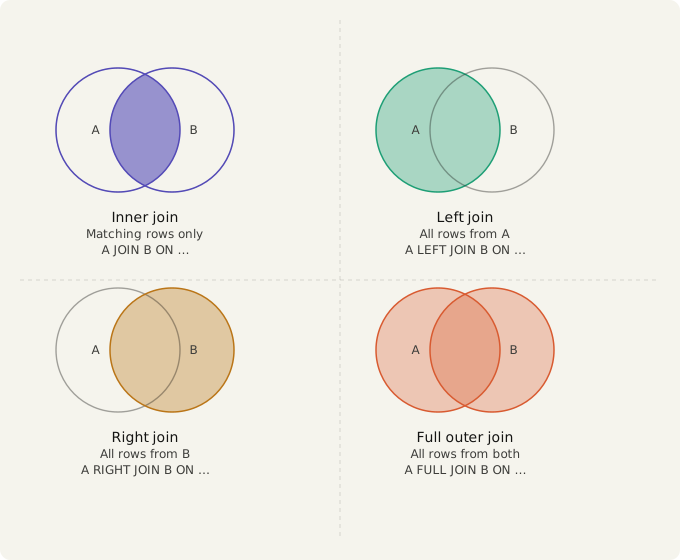
INNER JOIN returns only rows that match in both tables. Rows without a match on either side are dropped entirely.
LEFT JOIN returns all rows from the left table. Where there is no match in the right table, the right-side columns are NULL.
RIGHT JOIN returns all rows from the right table. Where there is no match in the left table, the left-side columns are NULL.
FULL JOIN returns all rows from both tables. Non-matching rows get NULL on the opposite side.
This lesson covers INNER JOIN. LEFT JOIN is covered next.
INNER JOIN
JOIN on its own means INNER JOIN. Both keywords produce the same result.
Syntax
SELECT columns
FROM table_a AS a          -- left table
JOIN table_b AS b ON a.foreign_key = b.primary_key;  -- right table

-- INNER JOIN is identical:
SELECT columns
FROM table_a AS a          -- left table
INNER JOIN table_b AS b ON a.foreign_key = b.primary_key;  -- right table
Example 1: Join orders to customers
Pair each order with the customer who placed it.
SELECT
    o.order_id,
    c.name AS customer_name,
    o.order_date,
    o.total_amount
FROM orders AS o              -- left table
JOIN customers AS c ON o.customer_id = c.customer_id;  -- right table
Result:
| order_id | customer_name | order_date | total_amount |
|---|---|---|---|
| 1 | Alice Johnson | 2024-01-05 | 999.00 |
| 2 | Alice Johnson | 2024-01-10 | 59.98 |
| 3 | Bob Smith | 2024-01-15 | 349.00 |
| 4 | Carol White | 2024-02-01 | 796.00 |
| 5 | Dave Brown | 2024-02-10 | 49.90 |
| 6 | Alice Johnson | 2024-03-01 | 349.00 |
| 7 | Bob Smith | 2024-03-15 | 999.00 |
| 8 | Eve Davis | 2024-04-01 | 89.97 |
| 9 | Carol White | 2024-04-10 | 999.00 |
Frank Lee (customer 6) has no orders and does not appear. INNER JOIN drops unmatched rows from both sides.
Example 2: Join orders to products
Add product details to each order.
SELECT
    o.order_id,
    p.name AS product_name,
    p.category,
    o.quantity,
    o.total_amount
FROM orders AS o              -- left table
JOIN products AS p ON o.product_id = p.product_id;  -- right table
Result:
| order_id | product_name | category | quantity | total_amount |
|---|---|---|---|---|
| 1 | Laptop | Electronics | 1 | 999.00 |
| 2 | Mouse | Electronics | 2 | 59.98 |
| 3 | Desk | Furniture | 1 | 349.00 |
| 4 | Chair | Furniture | 4 | 796.00 |
| 5 | Notebook | Stationery | 10 | 49.90 |
| 6 | Desk | Furniture | 1 | 349.00 |
| 7 | Laptop | Electronics | 1 | 999.00 |
| 8 | Mouse | Electronics | 3 | 89.97 |
| 9 | Laptop | Electronics | 1 | 999.00 |
| 10 | Notebook | Stationery | 5 | 24.95 |
Example 3: Joining three tables
You can chain multiple JOINs to bring together three or more tables.
SELECT
    o.order_id,
    c.name AS customer_name,
    p.name AS product_name,
    o.total_amount
FROM orders AS o                                              -- left table
JOIN customers AS c ON o.customer_id = c.customer_id         -- right table
JOIN products AS p ON o.product_id = p.product_id;           -- right table
Common Mistake
If a row in the left table has no match in the right table, it disappears from the result entirely. This is usually what you want, but can cause surprising data loss.
For example, if an order has a customer_id that doesn't exist in the customers table, that order won't appear in the result at all.
Use LEFT JOIN when you need to keep all rows from one side regardless of whether there's a match.
Practice
Write a query that returns order_id, customer_name (from customers.name), product_name (from products.name), and status for all orders.
Show answer
SELECT
    o.order_id,
    c.name AS customer_name,
    p.name AS product_name,
    o.status
FROM orders AS o                                              -- left table
JOIN customers AS c ON o.customer_id = c.customer_id         -- right table
JOIN products AS p ON o.product_id = p.product_id;           -- right table
Expected result (first few rows):
| order_id | customer_name | product_name | status |
|---|---|---|---|
| 1 | Alice Johnson | Laptop | completed |
| 2 | Alice Johnson | Mouse | completed |
| 3 | Bob Smith | Desk | completed |
| 4 | Carol White | Chair | completed |
| 5 | Dave Brown | Notebook | pending |
| ... | ... | ... | ... |